
Benefits and drawbacks of using cursor Vs Claude code
Cursor vs. Claude Code: Benefits and Drawbacks for Modern Software Development
Cursor and Claude Code are two prominent agentic coding tools, but they start from different design philosophies: Cursor is an AI-first editor built atop the Visual Studio Code experience, while Claude Code is a terminal-first agent that also integrates with popular IDEs and a browser-based interface[2][8][14][15].
This report compares benefits and drawbacks across capability, performance, pricing, security and privacy, offline modes, and developer experience, with practical guidance on when teams might favor one tool over the other.
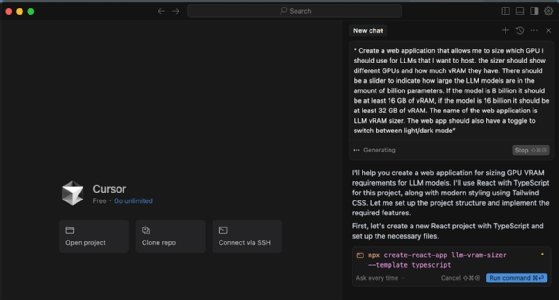
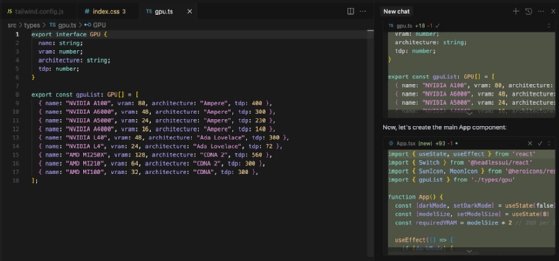
Cursor editor with AI features
A screenshot of the Cursor editor interface showing inline AI suggestions and multi-file change previews.
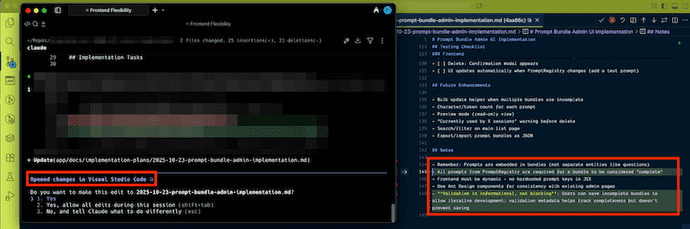
Claude Code terminal workflow
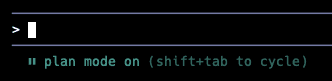
A terminal session using Claude Code to plan and execute multi-file refactors, alongside a VS Code integration panel.
What They Are and How They Work
Cursor layers an agentic AI system inside a VS Code-like editor and ships an AI engine called Composer that emphasizes low latency, with reporting that it runs substantially faster than comparable models while enabling multi-file, parallel agents and team workflows[1][2].
Its AI indexes your codebase for context-aware refactors and explanations, and it provides multiple interaction modes: Agent for autonomous multi-file changes, Manual for targeted edits, and Ask for learning about your code without applying changes[2][3].
Additional capabilities include @-tagging to pull relevant files or docs into context, image uploads for richer prompts, configurable task-specific modes, a visual web designer with live hot reload, and various workflow enhancements like commit message generation and multi-agent judging, though reviewers also note UI churn and a learning curve[3][6][7].
Claude Code is an agentic coding tool that lives in your terminal but works across IDEs and the web, translating natural-language tasks into concrete code changes while orchestrating debugging, linting, tests, and Git operations including commits[8][10][14][15][16].
It supports a plan-first workflow to review and refine strategies before execution, can delegate to specialized subagents and run tasks in parallel, and includes checkpointing with rollback plus user permission prompts for edits, aiming for safe, auditable automation at scale[9][13][17].
Capabilities and Strengths
Cursor strengths
- Deep codebase indexing for context-aware suggestions, refactors, and explanations in natural language[2].
- Multiple modes to match intent: Agent for autonomous changes, Manual for precise edits, and Ask to inspect without modifying[3].
- Parallel agents and team features such as shared custom rules and commands for consistent workflows[1].
- Inline previews and checkpoints in a familiar editor flow, making it easy to review changes before merging[34].
- Visual web designer for UI adjustments with hot reload, supporting fast iteration on front-end work[6].
Claude Code strengths
- Natural-language to real file changes, with automation of debugging, linting, tests, and Git workflows[10].
- Plan mode to iteratively refine strategy before executing edits, improving reliability on complex tasks[9].
- Delegation to subagents and parallel execution for larger projects and multi-step refactors[13][17].
- Checkpointing and rollback to safely revert if outcomes are not as expected[13].
- Works from terminal, IDEs, and web, enabling flexible usage patterns including mobile and Slack access[14][15].
Limitations and Drawbacks
Cursor drawbacks
- Can struggle with complex defects in large codebases, sometimes missing concurrency or dependency issues and requiring manual review[23].
- Occasional misplacement of generated code within files or projects leading to runtime errors[23].
- Performance degradation or instability in long sessions or large files, including freezes or crashes reported by users[26][24].
- Context maintenance issues across multi-file edits may cause incomplete or inconsistent changes[25].
- Tendency in some cases to overcomplicate simple tasks, increasing review effort, and occasional context loss across sessions[23][28][29].
- Some reports of unpredictable billing experiences and instability affecting productivity[27][28].
Claude Code drawbacks
- Performance can decline near the end of the context window, which complicates long or memory-intensive tasks[30].
- Strict usage limits with rolling five-hour windows and weekly compute caps can block new prompts until reset, interrupting sessions[31].
- High-context prompts may consume tens of thousands of tokens, requiring careful prompt and context management[31].
- Operational friction from environment or configuration issues can require troubleshooting IDE versions, extensions, and API keys[32].
Pricing and Cost Predictability
Cursor's Pro plan is about 20 USD per month, with a newer model that includes a fixed amount of API credits and bills overages by usage, which can lead to higher than expected costs for heavy users[19][18].
Claude Code is offered in several tiers: Claude Pro is roughly 17 USD per month when billed annually or about 20 USD monthly, and Claude Max is around 200 USD per month, with allowances geared to high token consumption for complex multi-file work[18][20][21].
Analyses suggest that Claude's subscription structure can be more cost efficient for sustained heavy use due to subsidized or generous usage within tiers, whereas Cursor's per-usage overage can make costs scale with intensity of work[18][20][22].
| Dimension | Cursor | Claude Code |
|---|---|---|
| Entry pricing | ~$20/mo Pro with included API credits, overages billed by usage[19][18]. | Pro ~$17/mo annually or ~$20/mo; Max ~$200/mo for heavy workloads[18][20][21]. |
| Cost predictability under heavy use | Costs can spike with heavy API usage beyond credits[18]. | Subscriptions designed to cover sustained usage without unexpected interruptions[20][21]. |
Security, Privacy, and Offline Considerations
Cursor offers a Privacy Mode that on Business plans can enforce zero data retention, while Free and Pro may collect inputs for evaluation unless you configure otherwise[39].
For indexing, Cursor chunks code and uploads it encrypted to compute embeddings, discards plaintext after processing, and retains vectors plus metadata to enable semantic search, though community posts discuss the practical implications of indexing under privacy settings[38][37].
Cursor's advanced features typically require cloud connectivity, although users have demonstrated local LLM setups via custom endpoints and proxies; community requests seek native local integration with tools like Ollama, and several guides outline configurations for local models[44][40][41][42][43].
Even with local models, some advanced features may be limited compared to cloud mode; options like Ghost mode aim to restrict data from leaving the device, though fully offline use in air-gapped environments remains challenging according to user reports[45][46][47].
Claude Code employs a permission model that defaults to read-only and prompts for consent before edits or command execution, supports hierarchical and file-level rules, and provides allowlists, asklists, and deny rules to enforce a zero-trust stance; the Agent SDK further allows custom approval policies and interactive tool controls[48][49][50].
Developer Experience and Performance Notes
Cursor emphasizes an AI-first IDE experience with inline completions, visual diff previews, and automatic checkpoints that give developers fine-grained control over changes within a familiar editor flow[34].
Claude Code emphasizes terminal-centric, agentic workflows optimized for natural language interactions and cross-file reasoning, which many teams prefer for large-scale automation and refactoring tasks[33].
Some developers have reported that recent updates led to slower responses from Claude Code on complex multi-turn tasks, while praising Cursor's newer CLI for fast startup and responsiveness that smooths transitions between drafting, debugging, and refactoring[35].
Cursor's Composer has been reported as notably low-latency compared to similar models, which can improve iteration speed during agentic edits[1].
Which Tool When: Practical Recommendations
- Prefer Cursor if you want an AI-native editor with inline review, visual diffs, and rich IDE ergonomics for frequent micro-iterations and code reviews[34].
- Prefer Claude Code if you want terminal-first, plan-and-execute workflows that automate multi-step tasks, including debugging, testing, and Git operations, with permissioned, auditable changes[10][9][48].
- For cost-sensitive heavy users, Claude's Pro and Max tiers often provide more predictable throughput for complex, long-running work, whereas Cursor's usage-based overage model may escalate costs under high load[18][20][21].
- For strict data control or offline needs, carefully evaluate Cursor's privacy modes and local model workarounds; plan for limits in offline features and test Ghost or similar configurations in your environment[39][40][45][46].
Conclusion
Cursor excels as an AI-native editor with fast agentic operations, deep codebase context, visual review controls, and web design tooling, making it compelling for developers who want AI embedded directly into daily editing and review loops[1][2][6][34].
Claude Code shines for terminal-oriented teams that value plan-first automation, parallel subagents, permissioned changes, and broad integration surfaces across IDE and web, though users must plan around context-window behavior and usage caps[9][13][14][30][31].
Pricing and governance considerations can be decisive: Cursor's usage-based overages reward light-to-moderate use, while Claude's Pro and Max tiers tend to favor sustained, heavy workloads with predictable allowances, and Claude's default read-only plus explicit permission model offers a strong safety baseline for enterprise workflows[18][20][21][48].
Let's look at alternatives:
- Modify the query.
- Start a new thread.
- Remove sources (if manually added).